Thư viện prompt AI OpenZhenZhen · MiniMax H3 · video
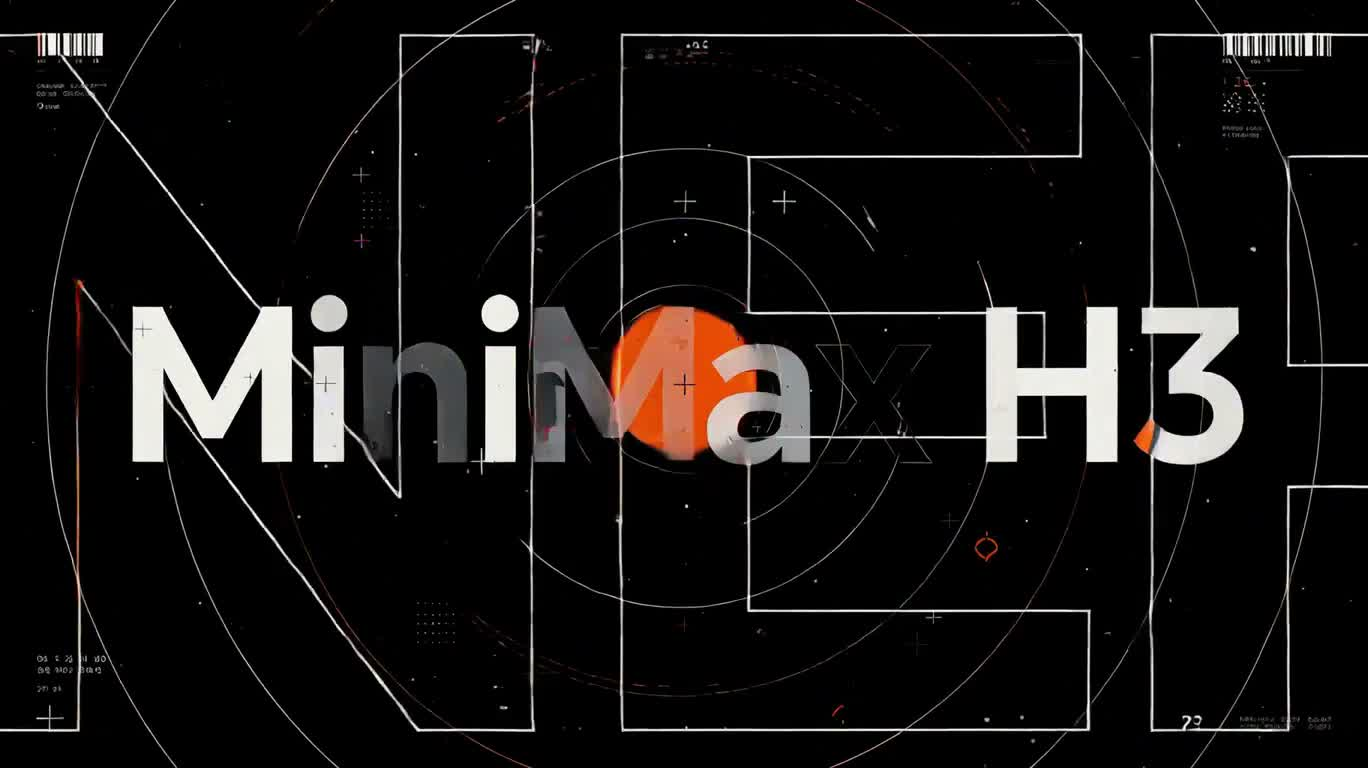
Sóng chữ cam đen: Đoạn mở đầu chuyển động ONEROOM
Orange-Black Type Wave: ONEROOM Motion Intro
Sóng chữ cam đen: Đoạn mở đầu chuyển động ONEROOM — khám phá tác phẩm được tạo bằng MiniMax H3 trên OpenZhenZhen, kèm prompt gốc và ví dụ tạo nội dung để tham khảo.
Prompt
Prompt tiếng Trung
制作一段15秒、16:9的扁平图形动态标题片,以粗重几何无衬线字体呈现。配色仅限米白、墨黑和高饱和橙色。所有文字都须清晰、稳定且拼写准确:“MiniMax H3”、“MOTION”、“GRAPHICS”、“NO EDIT”、“ONE SHOT”、“コピペで”、“超簡単!”、“ONEROOM”和“AI STUDIO”。大小写与空格严格按所示保留。画面上只出现这些文字。巨大的空心轮廓字“ONEROOM”作为壁纸,从右向左缓慢漂移。独立的中间装饰层包含条码带、细小UI刻度、套准标记、半色调网点、技术弧线和数据刻度,并以不同速度移动。除最后定格外,三个视觉层始终以不同速度运动。 0–1秒:黑底上,细线段从四边疾速涌入并旋向中央,同时一个巨大的橙色圆盘猛然砸入画面,带来强烈震动。1–2.6秒:碎线迅速拼成横跨画面的“MiniMax H3”;背景翻为米白,“H3”为橙色。2.6–3.4秒:快速推近橙色的“3”,直至其占满画面,然后短暂定格。3.4–5.2秒:橙色H形竖笔向上下延伸,将画面分成三列;其余字母飞离画面,三列以不同速度滚动。5.2–6.4秒:三列骤停,“MOTION”猛然砸入中央,字号巨大且清晰可读。6.4–8秒:切至黑底;白色线框网格倾斜并向远处延伸,重复出现的“GRAPHICS”沿网格朝观众流来。8–10秒:闪切经过四张构图各异的图形卡片,每张依次只展示一个短语:“NO EDIT”、“ONE SHOT”、“コピペで”、“超簡単!”。每张卡片采用不同的尺寸与版式,卡片之间以短促的快门闪光分隔。10–12秒:卡片收缩成一个橙色光点;“ONEROOM”分成两半从画面两侧疾速冲入,在中央碰撞并拼成完整单词,橙色同心冲击波向外迸发,扁平碎片四散飞出。12–13.8秒:碎片飞出画面,组成上下居中的两行标题,上行为“AI STUDIO”,下行为“ONEROOM”,中间以一条短橙线分隔;背景翻为米白。13.8–15秒:最终构图完全静止定格。全程保持字体整洁易读,不出现乱码或额外文字。
Prompt tiếng Anh
Create a 15-second, 16:9 flat graphic motion-design title sequence with bold, geometric sans-serif typography and a limited palette of off-white, ink black, and vivid orange. Keep every word crisp, stable, and correctly spelled: “MiniMax H3”, “MOTION”, “GRAPHICS”, “NO EDIT”, “ONE SHOT”, “コピペで”, “超簡単!”, “ONEROOM”, and “AI STUDIO”. Use the exact capitalization and spacing shown. The only lettering on screen is these phrases. Oversized hollow-outline “ONEROOM” wallpaper drifts slowly from right to left behind the action. A separate middle layer of barcode strips, tiny UI ticks, registration marks, halftone dots, technical arcs, and data ticks moves at a different speed. Keep all three visual layers moving independently except during the final hold. 0–1s: On black, fine line segments rush in from all edges and spiral toward the center as a large orange disk slams into view with a sharp impact shake. 1–2.6s: The fragments snap together to form “MiniMax H3” across the frame; the background flips to off-white, with “H3” in orange. 2.6–3.4s: Snap-zoom into the orange “3” until it fills the frame, then freeze briefly. 3.4–5.2s: The orange H stem stretches vertically to divide the frame into three columns; the other letters fly away while the columns scroll at different speeds. 5.2–6.4s: The columns stop and “MOTION” slams into the center, large and readable. 6.4–8s: Cut to black; a tilted white wireframe grid recedes in perspective as repeated “GRAPHICS” forms flow toward the viewer. 8–10s: Flash-cut through four distinct graphic cards, one phrase per card in this order: “NO EDIT”, “ONE SHOT”, “コピペで”, “超簡単!”. Give each card a different scale and layout, with a brief shutter flash between cards. 10–12s: The cards collapse into an orange point; two halves of “ONEROOM” rush in from opposite sides and collide into one centered word as orange concentric shockwaves burst outward and flat shards scatter. 12–13.8s: The shards clear. Settle “AI STUDIO” above “ONEROOM” in a centered two-line lockup, separated by a short orange rule; flip the background to off-white. 13.8–15s: Hold the finished composition completely still. Keep typography clean and legible throughout, with no glitches or extra text.
Chủ đề và phong cách
Xem thêm prompt hình ảnh và video · Tạo hình ảnh · Tạo video · Tạo trên canvas AI
Tác phẩm liên quan
- Quả bóng chuyền cam trên sân dưới nắng gắt
Quả bóng chuyền cam trên sân dưới nắng gắt — khám phá tác phẩm được tạo bằng MiniMax H3 trên OpenZhenZhen, kèm prompt gốc và ví dụ tạo nội dung để tham khảo.
- Phòng tắm hiện đại yên tĩnh và sạch sẽ
Phòng tắm hiện đại yên tĩnh và sạch sẽ — khám phá tác phẩm được tạo bằng MiniMax H3 trên OpenZhenZhen, kèm prompt gốc và ví dụ tạo nội dung để tham khảo.
- Thỏ nhảy về phía bên trái bàn
Thỏ nhảy về phía bên trái bàn — khám phá tác phẩm được tạo bằng MiniMax H3 trên OpenZhenZhen, kèm prompt gốc và ví dụ tạo nội dung để tham khảo.
- Tiếng hát ngẫu hứng trong bữa tối dưới ánh nến
Tiếng hát ngẫu hứng trong bữa tối dưới ánh nến — khám phá tác phẩm được tạo bằng MiniMax H3 trên OpenZhenZhen, kèm prompt gốc và ví dụ tạo nội dung để tham khảo.
- Ánh mắt lo âu trong tiệm đổi tiền mờ tối
Ánh mắt lo âu trong tiệm đổi tiền mờ tối — khám phá tác phẩm được tạo bằng MiniMax H3 trên OpenZhenZhen, kèm prompt gốc và ví dụ tạo nội dung để tham khảo.
- 雨夜霓虹街舞对决