OpenZhenZhen AI 提示词画廊 · Claude Opus 5.5 · video
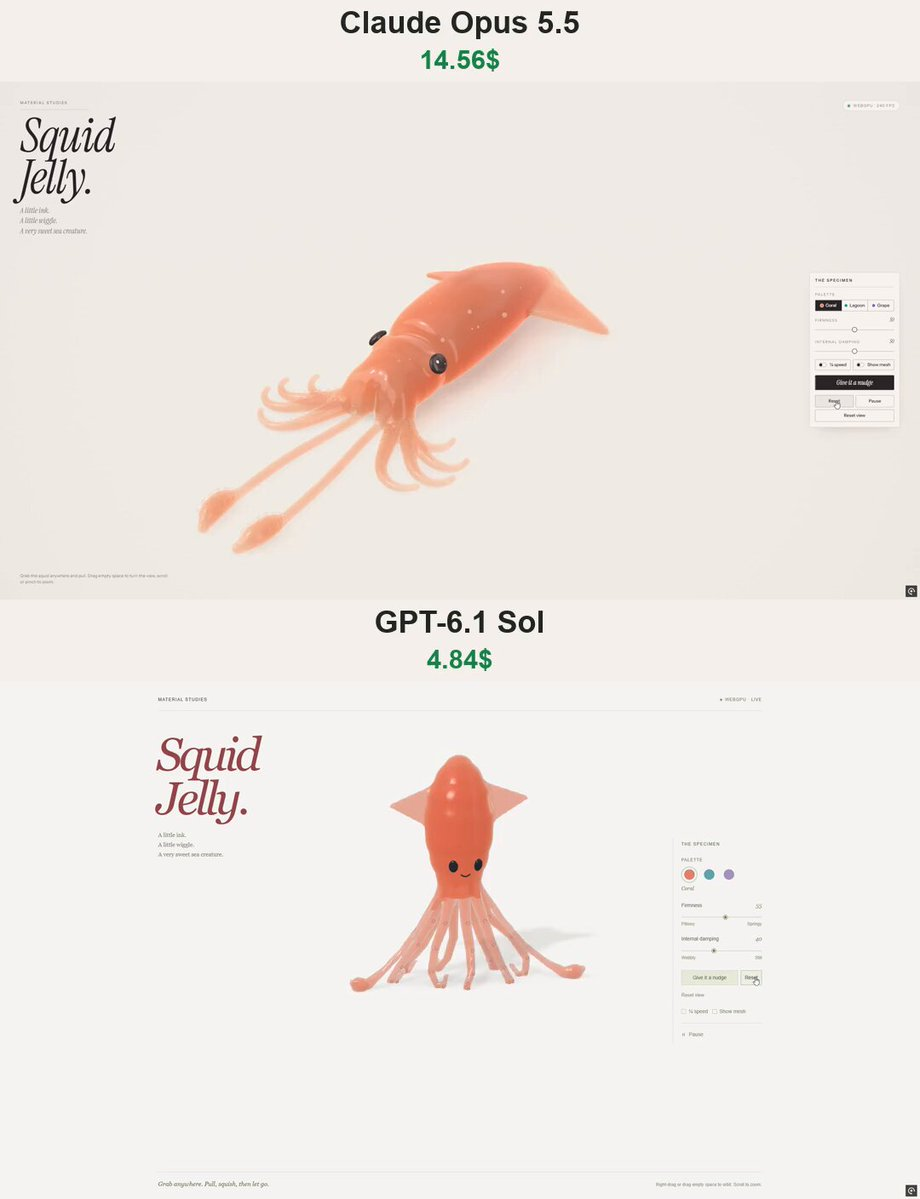
软糖鱿鱼渲染:Opus 5.5对比GPT-6.1 Sol
Gummy Squid Render: Opus 5.5 vs GPT-6.1 Sol
一个用WebGPU和软体物理渲染的半透明3D软糖鱿鱼互动玩具,根据同一长详细提示分别由Claude Opus 5.5和GPT-6.1 Sol生成,并比较了外观和预估API成本。
提示词 / Prompt
English prompt
Create “Squid Jelly” — a beautiful, interactive 3D gummy squid that users can grab, stretch, and squish directly in their browser. Deliver a complete standalone HTML file using genuine WebGPU. ART DIRECTION Make the squid look like a premium translucent gummy candy: - An elongated, tapered mantle with a rounded tip. - Two broad, thin, diamond-shaped side fins. - Eight shorter curled arms and two longer feeding tentacles with rounded club-shaped tips. - Small suction cups and a cute, understated face. Use a warm off-white background, soft studio lighting, and a subtle ground shadow. Keep the squid large and centered, with an elegant, uncluttered composition. GEOMETRY Generate all geometry procedurally. No external models or image files. Connect the arms, tentacles, and fins smoothly to the body. Their roots must remain embedded and attached during strong pulls, with no visible gaps or floating parts. Suction cups and eyes must follow the deforming surface. Give the fins a thin, flexible profile and the longer tentacles slender shafts with thicker tips. JELLY MATERIAL Create convincing glossy, translucent jelly: - Thickness-dependent color absorption. - Refraction and soft internal light scattering. - Smooth studio reflections and delicate rim highlights. - A few tiny bubbles embedded inside the material. - Richer color in thick areas and greater translucency along thin fins and tentacle tips. Avoid opaque plastic, washed-out colors, blown-out highlights, visible mesh seams, and flickering transparency. SOFT-BODY PHYSICS Use a stable mass-spring or position-based dynamics simulation with approximate volume preservation. The mantle should feel soft but substantial. Arms should bend independently, while long tentacles and fins should be more flexible. Let users grab the body, fins, or tentacles at the clicked location. Pulling must deform the nearby geometry first, with the rest following elastically. Do not fake softness by scaling or rotating the entire model. On release, the squid should wobble, recover its shape, and gradually settle. Include gravity, floor collisions, friction, and damping. Prevent appendages from passing through the floor. Use fixed simulation steps, bounded stretching, and robust attachment constraints so repeated strong pulls cannot tear the model apart or destabilize the simulation. INTERACTION - Left-click or touch the squid to grab and stretch it. - Right-drag or drag empty space to gently orbit the camera. - Support limited zoom and mobile touch controls. - Keep camera gestures separate from object dragging. Add: - Give it a nudge - Reset - Reset view - Pause - Firmness slider - Internal damping slider - ¼ speed toggle - Show mesh toggle Provide three material palettes: Coral, Lagoon, and Grape. Switching colors must not reset the simulation. INTERFACE Use a minimal editorial layout: - Top left: small “MATERIAL STUDIES” label. - Large italic serif heading: “Squid Jelly.” - Caption: “A little ink. A little wiggle. A very sweet sea creature.” - Top right: WebGPU status indicator. - Right side: compact “THE SPECIMEN” control panel. - Bottom left: a short interaction hint. Use clean sans-serif controls, thin borders, and generous whitespace. Adapt the layout for mobile without covering the squid. QUALITY AND PERFORMANCE Use real 3D geometry and native WebGPU rendering with WGSL shaders, not a 2D imitation or prerecorded animation. Reuse meshes and buffers. Do not reconstruct geometry during dragging. Prioritize stable interactions and smooth performance. Test strong pulls, repeated releases, appendage attachments, floor collisions, palette changes, pause, reset, and camera controls. Provide a clear fallback message if WebGPU is unavailable. Deliver the full working HTML, not a mockup or code fragment. The result should feel like a little living gummy toy: glossy, weighty, flexible, and irresistibly satisfying to stretch.
主题与风格
探索更多图片和视频提示词 · 生成图片 · 生成视频 · 在 AI 画布中创作
相关作品
- Jelly world Arctic island: Opus vs Astra
The creator compared Claude Opus 5.5 and ChatGPT-6 Astra on the same detailed prompt to build an interactive Arctic diorama in a single HTML file with native WebGPU, preferring Opus's visuals and colors.
- OpenAI agent dots animation: Opus vs GPT-6.1
The creator compared GPT-6.1 Sol Max and Opus 5.5 by making a short animation explaining how OpenAI agents work, from a simple prompt that was not published.
- Animated website from a single image: Opus vs GPT-6.1
The creator compared Claude Opus 5.5 and GPT-6.1 Sol generating animated websites from a single image, using Higgsfield MCP access for the animation, noting Opus took longer but produced more detailed results. 原作需要参考素材;请自行准备图片、视频、音频、文档或代码库等输入。
- Jelly effect model comparison
Four AI models (Mistral Large v4, Kimi K3, GPT 6.1 Sol, Claude Opus 5.5) were each asked to recreate the famous jelly effect, with results compared in a video.
- Opus vs Astra diorama comparison (Blender)
原作需要参考素材;请自行准备图片、视频、音频、文档或代码库等输入。
- Pachinko effect: Opus 5.5 version
原作者未提供提示词,可直接把视频发给 Claude Opus/Sonnet 5.5 或者以上版本作为参考视频,可直接生成同样风格。