OpenZhenZhen AI 프롬프트 갤러리 · gpt-image-2.5 · image
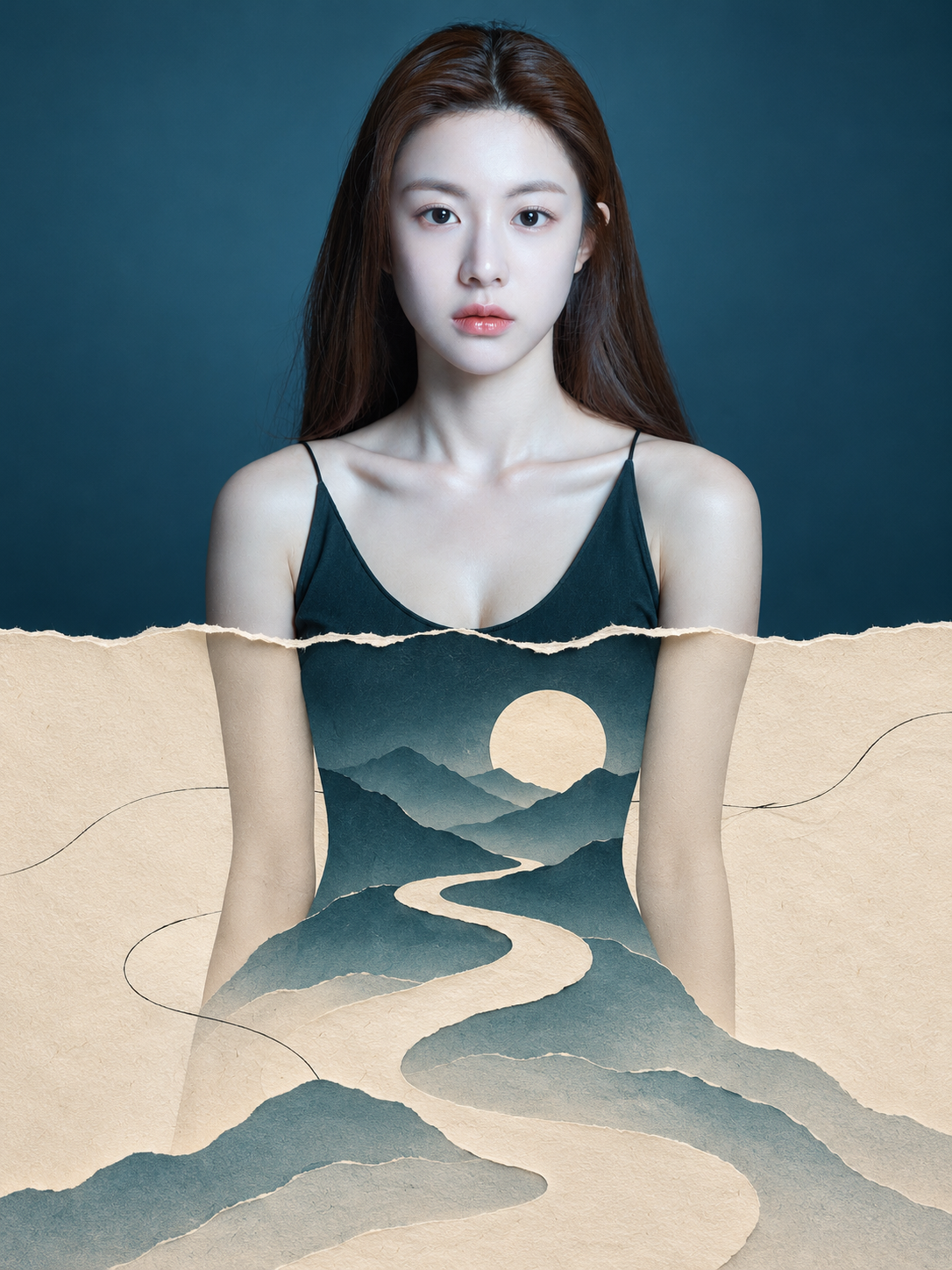
현실과 종이공예 세계가 어우러진 세로형 포스터
Vertical Poster Where Reality Meets the Papercut World
‘현실과 종이공예 세계가 어우러진 세로형 포스터’은(는) gpt-image-2.5로 만든 작품입니다. OpenZhenZhen에서 원본 프롬프트와 생성 예시를 살펴보고 새로운 창작에 활용해 보세요.
프롬프트
중국어 프롬프트
用用户提供的一张照片创作一张独立的高端编辑风格海报。不要制作拼贴,也不要合并多张图片。采用竖版 3:4 画布,严格分成上下两个等高区域,目标为各占画布高度的 50%,分界位于中点。两部分共同构成一个连续场景:上半部分是写实照片,下半部分则像从原图内部自然生长出来的超现实剪纸“第二世界”。 上半部分——忠实保留摄影 忠实保留原照片中的主体身份、主要对象、服装、配饰、物体、环境、构图、姿势、比例、空间关系、透视、材质、景深、自然光影、阴影及整体色彩氛围。不要重绘、替换、重新排列或重新诠释原有元素。为适应画布,只允许轻微裁剪、自然延展背景和极轻微调色。切勿拉伸或扭曲主体,也不要改变主体原有的动作或姿势。在图像工具能力范围内尽量忠实保留照片;无法保证逐像素原样复现。若照片中有主要人物,仅将当前配置的固定面部参考图 ref-10a-v1 用作面部身份线索。场景、姿势、服装和构图仍以用户照片为准;若身份线索冲突,插画中的面部以固定参考图为准,因此无法保证身份完全连贯。 两部分之间的连续性——最高优先级 对每张照片,找出一个延伸至水平中点的自然结构元素,例如道路、水面、树枝、光束、建筑特征或身体姿态。让该元素在分界处对齐,并无缝延续至下半部分。同一场景应呈现出跨越边界并逐渐转化的效果,仿佛中点以下的物理规则发生了变化。 中央分界——自然撕纸边缘 可以沿着源照片结构和构图的自然走势加入不规则撕纸边缘。它不能显得装饰化,也不能套用固定模板。边缘须完全平贴画布,不得出现投影、卷边、翘角或立体厚度。原有元素可以触及、穿过或突破撕裂边界,形成自然融合的过渡。 下半部分——第二世界 以暖象牙色纸张为基础,带有隐约可见的纤维、触感纹理和充足留白。从原有结构与分界相接处开始向下延续场景。保留原照片的视觉焦点、主体轮廓、姿势、透视、固有色彩、光线、情绪氛围和叙事。在这些保留元素的基础上,使用克制的摄影碎片、精心构成的剪纸形状以及少量黑色手绘线条。转化应像原照片的自然延伸,而不是无关的插画。 最终作品应是一张精致的高端编辑风格海报,让写实摄影有机地过渡到具有触感的超现实剪纸世界,同时保持视觉连贯、空间衔接精准、风格优雅克制且富有纵深。以上下等高并在中点准确分割为目标;图像工具可能无法实现数学上完全精确的分区比例。
영어 프롬프트
Create one standalone premium editorial poster from one user-supplied photograph. Do not make a collage or combine images. Use a vertical 3:4 canvas split into two equal horizontal halves, targeting an exact 50/50 division at the midpoint. The halves form one continuous scene: a realistic photograph above and a surreal paper-cut “second world” that seems to grow naturally from within it below. UPPER HALF — PHOTOGRAPHIC PRESERVATION Faithfully retain the photograph’s subject identity, primary subjects, clothing, accessories, objects, environment, composition, poses, proportions, spatial relationships, perspective, materials, depth of field, natural lighting, shadows, and overall color atmosphere. Do not redraw, replace, rearrange, or reinterpret original elements. Only subtle cropping, natural background extension, and extremely light color grading are allowed to fit the canvas. Never stretch or distort the subject or change its original movement or pose. Preserve the photo as faithfully as the image tool allows; pixel-identical reproduction is not guaranteed. If the photo includes a main visible person, use the configured fixed face reference ref-10a-v1 only for facial identity cues. The uploaded photo remains the source for scene, pose, clothing, and composition; if these identity cues conflict, the fixed reference governs the illustrated face, so exact identity continuity cannot be guaranteed. CONTINUITY — HIGHEST PRIORITY For each photo, identify a natural structural element that reaches the horizontal midpoint, such as a road, body of water, tree branch, beam of light, architectural feature, or bodily gesture. Align this element at the division and continue it seamlessly into the lower half. Make the same scene appear to cross the boundary and gradually transform, as though its physical rules change beyond the midpoint. CENTER DIVISION — NATURAL TORN-PAPER EDGE An irregular torn-paper edge may follow the source structure and natural composition flow. It must not look decorative or use a fixed template. Keep it completely flat against the canvas, without cast shadows, curled edges, lifted corners, or 3D thickness. Original elements may touch, cross, or break through it to create an integrated transition. LOWER HALF — THE SECOND WORLD Use warm ivory paper with subtly visible fibers, tactile texture, and generous negative space. Continue building the scene downward from where the original structure meets the division. Preserve the photograph’s visual focal point, subject silhouettes, poses, perspective, inherent colors, lighting, emotional atmosphere, and narrative. Develop these elements with restrained photographic fragments, carefully composed paper-cut shapes, and only a few black hand-drawn lines. Make the transformation feel like a natural extension of the photo, not an unrelated illustration. The finished work should be a sophisticated premium editorial poster in which realistic photography transitions organically into a tactile surreal paper-cut world, with coherent imagery, precise spatial continuity, elegant restraint, and strong depth. Aim for the exact midpoint and equal halves; the image tool may not achieve mathematically exact panel proportions.
더 많은 이미지·동영상 프롬프트 보기 · 이미지 생성 · 동영상 생성 · AI 캔버스에서 만들기
관련 작품
- 십이궁 그리드 캐릭터 헤어스타일 디자인 대전
‘십이궁 그리드 캐릭터 헤어스타일 디자인 대전’은(는) gpt-image-2.5로 만든 작품입니다. OpenZhenZhen에서 원본 프롬프트와 생성 예시를 살펴보고 새로운 창작에 활용해 보세요.
- 여름 8가지 코디 자유 콜라주
‘여름 8가지 코디 자유 콜라주’은(는) gpt-image-2.5로 만든 작품입니다. OpenZhenZhen에서 원본 프롬프트와 생성 예시를 살펴보고 새로운 창작에 활용해 보세요.
- 초현실적 패션 잡지 표지 화보
‘초현실적 패션 잡지 표지 화보’은(는) gpt-image-2.5로 만든 작품입니다. OpenZhenZhen에서 원본 프롬프트와 생성 예시를 살펴보고 새로운 창작에 활용해 보세요.
- 미니멀 베이지 스튜디오 인물 클로즈업
‘미니멀 베이지 스튜디오 인물 클로즈업’은(는) gpt-image-2.5로 만든 작품입니다. OpenZhenZhen에서 원본 프롬프트와 생성 예시를 살펴보고 새로운 창작에 활용해 보세요.
- 질감이 살아있는 하이엔드 상업 미녀 광고
‘질감이 살아있는 하이엔드 상업 미녀 광고’은(는) gpt-image-2.5로 만든 작품입니다. OpenZhenZhen에서 원본 프롬프트와 생성 예시를 살펴보고 새로운 창작에 활용해 보세요.
- 프리미엄 미니멀 인물 포스터 디자인
‘프리미엄 미니멀 인물 포스터 디자인’은(는) gpt-image-2.5로 만든 작품입니다. OpenZhenZhen에서 원본 프롬프트와 생성 예시를 살펴보고 새로운 창작에 활용해 보세요.