OpenZhenZhen AI 프롬프트 갤러리 · gpt-image-2.5 · image
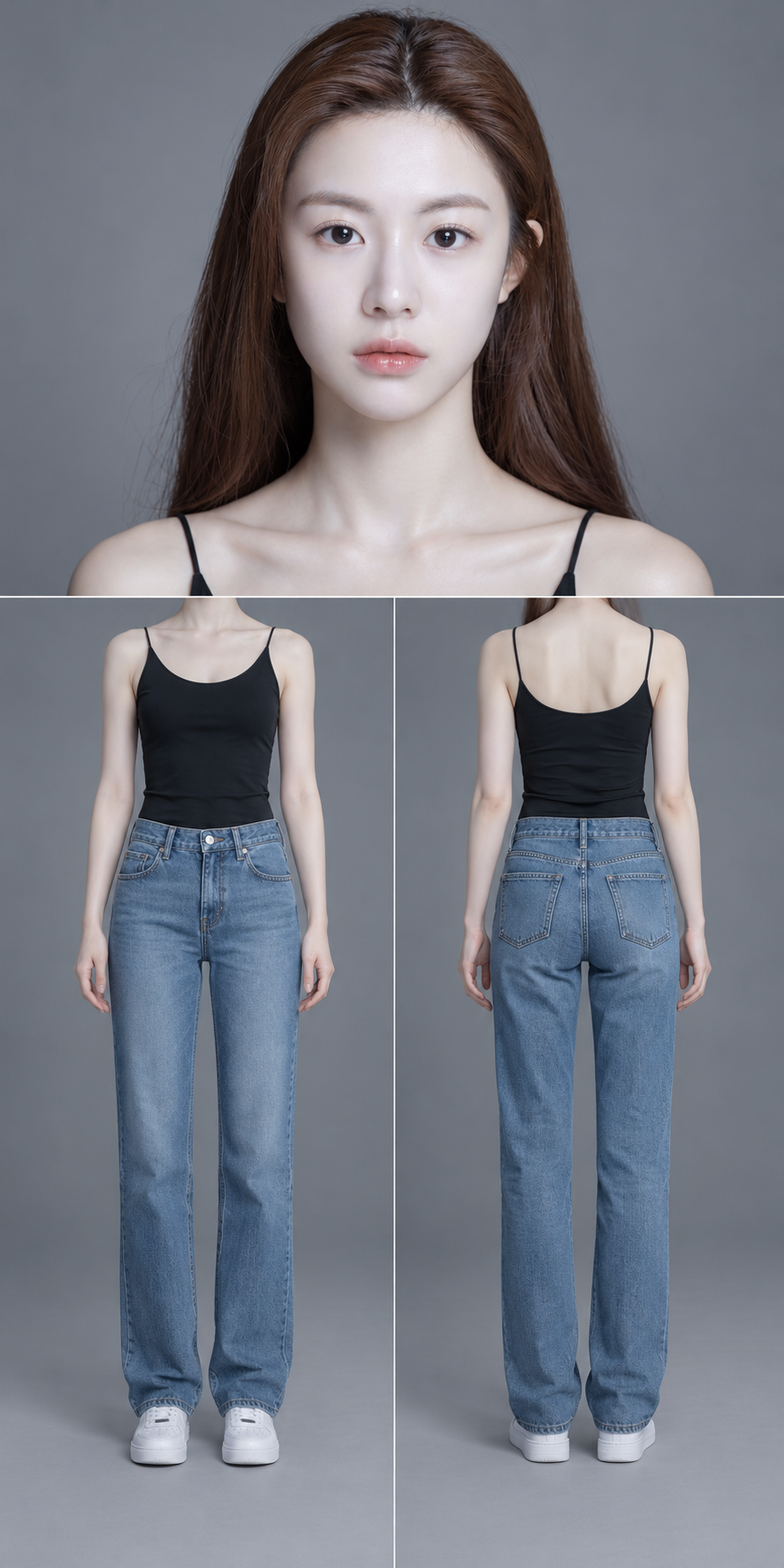
세로형 캐릭터 삼면도 참고 보드
Vertical Character Three-View Reference Board
‘세로형 캐릭터 삼면도 참고 보드’은(는) gpt-image-2.5로 만든 작품입니다. OpenZhenZhen에서 원본 프롬프트와 생성 예시를 살펴보고 새로운 창작에 활용해 보세요.
프롬프트
중국어 프롬프트
使用配置的人物身份参考作为唯一身份依据,为同一人物创作一张竖版 1:2 人物参考板。保留参考图中可见的面部身份、年龄观感、肤色、发型和画风,不重新设计角色。参考图只展示了部分身体,因此不要声称能够准确还原未展示的服装、身体细节或鞋履;用简洁基础服装合理补全,并与可见身份和画风协调。 固定版式 画布上下平均分为两半。上半区放置一张正面完整头部特写。下半区才分成左右等宽视图:左侧为身体正面,右侧为身体背面。只使用一条位于画布正中线的水平细线,以及一条仅贯穿下半区的竖直细线。 上半区——头部 人物正对镜头,目光平视,表情自然。完整展示头顶、发型、参考图中可见的头饰、双耳轮廓和下巴。以完整头部及发型外轮廓为缩放依据,在不裁切的前提下尽量放大,仅留少量安全边距。下巴以下只保留必要颈部,不要变成半身视图。保留参考图中的面部比例与特征。若采用写实画风,保留自然毛孔、细微皮肤纹理、真实发丝和柔和反光,避免磨皮或塑料质感。 下半区——身体正面与背面 两个人体视图均从肩部展示至鞋底,并完全省略头部和头发。人物自然直立,双臂稍微离开躯干,手指放松。两个视图等比例,各占所在分区高度约 90%;肩线、腰线、膝盖和鞋底对齐。手、脚和服装均保持可见。参考图未展示的部分用简洁基础服装补全。正背面服装、材质、颜色和配饰保持一致;不可见的背面结构根据可见设计合理延续,不增加装饰。 风格与排除项 使用干净的中性灰影棚背景和柔和三点布光,保持光色与曝光一致。保留自然材质细节和参考图原有画风。严格只展示这三个视图,不添加其他视图。不要添加文字、编号、额外画框、装饰或水印。
영어 프롬프트
Create one vertical 1:2 character reference sheet for exactly one person, using the configured identity reference as the sole identity source. Preserve the reference’s observable facial identity, age appearance, skin tone, hairstyle and visual style; do not redesign the character. The reference shows only part of the body, so do not claim to recover unseen clothing, body details or footwear accurately. Complete unseen areas with simple basic clothing and a plausible continuation consistent with the visible identity and style. FIXED LAYOUT Divide the canvas into equal upper and lower halves. The upper half contains one front-facing, complete head close-up. Split only the lower half into equal left and right views: a front body view on the left and a back body view on the right. Use one thin horizontal divider at the exact canvas midpoint and one thin vertical divider only across the lower half. UPPER HALF — HEAD Show the full head facing camera with a level gaze and natural expression. Include the complete crown, hairstyle, any visible headwear, both ear outlines and chin. Scale the complete head and hair silhouette as large as possible without cropping, leaving only a small safety margin. Include only the necessary neck below the chin; do not turn this into a half-body view. Preserve the reference’s facial proportions and features. If rendered realistically, retain natural pores, subtle skin texture, real hair strands and soft reflections; avoid smoothing or plastic skin. LOWER HALF — FRONT AND BACK BODY Show both bodies from shoulders to shoe soles, with heads and hair fully omitted. Stand naturally upright with arms slightly away from the torso and relaxed fingers. Make the two views equal in scale, each filling about 90% of its panel height; align shoulders, waist, knees and soles. Keep hands, feet and clothing visible. Use simple basic clothing for details the reference does not show. Keep the front and back clothing, materials, colors and accessories consistent. Continue unseen back details plausibly from the visible design without adding decoration. STYLE AND EXCLUSIONS Use a clean neutral-gray studio background and soft three-point lighting with consistent color and exposure. Preserve natural material detail and the reference’s original visual style. Show exactly these three views and no others. Add no text, numbers, extra frames, decoration or watermark.
더 많은 이미지·동영상 프롬프트 보기 · 이미지 생성 · 동영상 생성 · AI 캔버스에서 만들기
관련 작품
- Image2.5 체험
‘Image2.5 체험’은(는) zhenzhen-image-g-v2.5-lowprice로 만든 작품입니다. OpenZhenZhen에서 원본 프롬프트와 생성 예시를 살펴보고 새로운 창작에 활용해 보세요.
- 꿀빛 눈동자 소녀의 익스트림 패션 뷰티 클로즈업
‘꿀빛 눈동자 소녀의 익스트림 패션 뷰티 클로즈업’은(는) gpt-image-2.5로 만든 작품입니다. OpenZhenZhen에서 원본 프롬프트와 생성 예시를 살펴보고 새로운 창작에 활용해 보세요.
- 청회색 톤 속 반항적인 거리 바이커 소년
‘청회색 톤 속 반항적인 거리 바이커 소년’은(는) gpt-image-2.5로 만든 작품입니다. OpenZhenZhen에서 원본 프롬프트와 생성 예시를 살펴보고 새로운 창작에 활용해 보세요.
- 거친 스타일의 터프 가이 일러스트
‘거친 스타일의 터프 가이 일러스트’은(는) gpt-image-2.5로 만든 작품입니다. OpenZhenZhen에서 원본 프롬프트와 생성 예시를 살펴보고 새로운 창작에 활용해 보세요.
- 기하학적 종이접기 남자 초상화
‘기하학적 종이접기 남자 초상화’은(는) gpt-image-2.5로 만든 작품입니다. OpenZhenZhen에서 원본 프롬프트와 생성 예시를 살펴보고 새로운 창작에 활용해 보세요.
- 눈 내리는 밤 고급차 옆의 흑백 빛 속 냉철한 신사
‘눈 내리는 밤 고급차 옆의 흑백 빛 속 냉철한 신사’은(는) gpt-image-2.5로 만든 작품입니다. OpenZhenZhen에서 원본 프롬프트와 생성 예시를 살펴보고 새로운 창작에 활용해 보세요.