OpenZhenZhen AI 프롬프트 갤러리 · MiniMax H3 · video
종이 예술 인터페이스: 가볍고 효율적인 작업 흐름
Paper Art Interface: Light and Efficient Task Flow
‘종이 예술 인터페이스: 가볍고 효율적인 작업 흐름’은(는) MiniMax H3로 만든 작품입니다. OpenZhenZhen에서 원본 프롬프트와 생성 예시를 살펴보고 새로운 창작에 활용해 보세요.
프롬프트
중국어 프롬프트
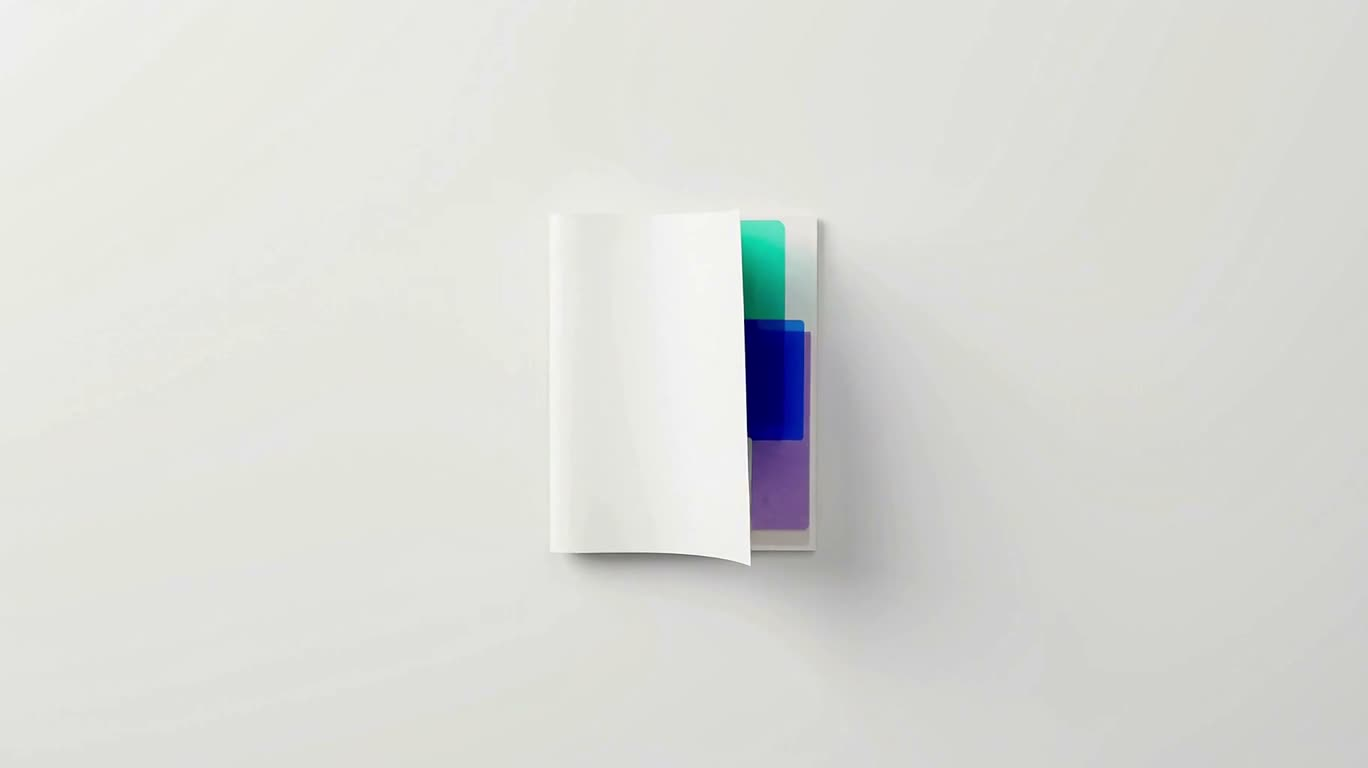
制作一支15秒高级产品发布动态视频:纯白棚拍、柔和自然光、电影级微距摄影,采用精致的 Google/Apple Material Design 风格,将彩色纸张工艺、半透明材质与干净的悬浮式效率仪表盘结合,画幅16:9。0–2.5秒:白色背景中央放置紧凑的白页纸张堆叠,夹有青绿色、蓝色和紫色半透明纸张,留白充足,仅做呼吸般的轻微浮动。2.5–5秒:通过纸张擦除和遮罩显现,把纸堆转化为悬浮仪表盘;主面板、卡片、按钮和标签依次出现,使用顺滑的 Material 缓动,周围漂浮少量柔和彩纸装饰。5–7.5秒:切换到斜向俯视微距镜头,带轻微视差和缓慢横向移动;分层的界面控件悬浮在绿色网格纸、蓝色透明带、紫色折叠纸和橙色卡片之上。7.5–11.5秒:扩展为由内容、文件和任务卡片组成的宽幅卡片墙,执行协调的卡片级联、布局重排和柔和滑入;随后转为任务完成场景,出现醒目的薄荷绿色提示语“Easily complete tasks(轻松完成任务)”、右侧功能区和清晰的高亮提示。11.5–15秒:仪表盘稳定定格,保留完成提示、任务菜单、右侧功能卡和彩色装饰锚点,以平滑缓出结束。文字清晰易读,材质具有纸张触感,阴影柔和,动作克制,整体干净、精致、高级。不要人物,不依赖音频叙事,不出现品牌标志或水印。
영어 프롬프트
Create a 15-second premium product-launch motion video in a pure white studio with soft natural light, cinematic macro photography, and a refined Google/Apple Material Design aesthetic. Combine colorful paper craft, translucent materials, and a clean floating productivity dashboard in a 16:9 frame. 0–2.5s: Center a compact stack of white sheets with teal, blue, and purple translucent pages on a white background; keep generous negative space and show only subtle breathing-like floating motion. 2.5–5s: Use a paper-wipe and masked reveal to transform the stack into a floating dashboard; reveal the main panel, cards, buttons, and labels in sequence with smooth Material easing, while small pastel paper accents drift around it. 5–7.5s: Move to an oblique overhead close-up with gentle parallax and a slow lateral camera glide over layered interface controls resting above a green grid sheet, blue transparent strips, folded purple paper, and orange cards. 7.5–11.5s: Expand into a broad wall of content, file, and task cards; animate a coordinated card cascade, layout reflow, and soft sliding rearrangement. Transition into a task-completion composition with a prominent mint-green callout reading “Easily complete tasks,” a right-side function area, and clear highlight cues. 11.5–15s: Stabilize the final dashboard with the completion callout, task menu, right-side feature card, and colorful decorative anchors; finish with a smooth ease-out hold. Keep typography crisp and legible, materials tactile, shadows soft, motion restrained, and the overall image clean, polished, and premium. No people, no audio-dependent storytelling, no brand logos or watermarks.
주제 및 스타일
더 많은 이미지·동영상 프롬프트 보기 · 이미지 생성 · 동영상 생성 · AI 캔버스에서 만들기
관련 작품
- 승리의 순간, 슬로모션 색종이
‘승리의 순간, 슬로모션 색종이’은(는) MiniMax H3로 만든 작품입니다. OpenZhenZhen에서 원본 프롬프트와 생성 예시를 살펴보고 새로운 창작에 활용해 보세요.
- 폭풍 속의 자전거 탄 사람
‘폭풍 속의 자전거 탄 사람’은(는) MiniMax H3로 만든 작품입니다. OpenZhenZhen에서 원본 프롬프트와 생성 예시를 살펴보고 새로운 창작에 활용해 보세요.
- 황혼의 다리 위 추격전
‘황혼의 다리 위 추격전’은(는) MiniMax H3로 만든 작품입니다. OpenZhenZhen에서 원본 프롬프트와 생성 예시를 살펴보고 새로운 창작에 활용해 보세요.
- 비 오는 창가의 두 고양이
‘비 오는 창가의 두 고양이’은(는) MiniMax H3로 만든 작품입니다. OpenZhenZhen에서 원본 프롬프트와 생성 예시를 살펴보고 새로운 창작에 활용해 보세요.
- 설산 도로의 랠리카와 뒤쫓는 눈사태
‘설산 도로의 랠리카와 뒤쫓는 눈사태’은(는) MiniMax H3로 만든 작품입니다. OpenZhenZhen에서 원본 프롬프트와 생성 예시를 살펴보고 새로운 창작에 활용해 보세요.
- 생체 기계 고슴도치 초상화
‘생체 기계 고슴도치 초상화’은(는) MiniMax H3로 만든 작품입니다. OpenZhenZhen에서 원본 프롬프트와 생성 예시를 살펴보고 새로운 창작에 활용해 보세요.