OpenZhenZhen AI 프롬프트 갤러리 · MiniMax H3 · video
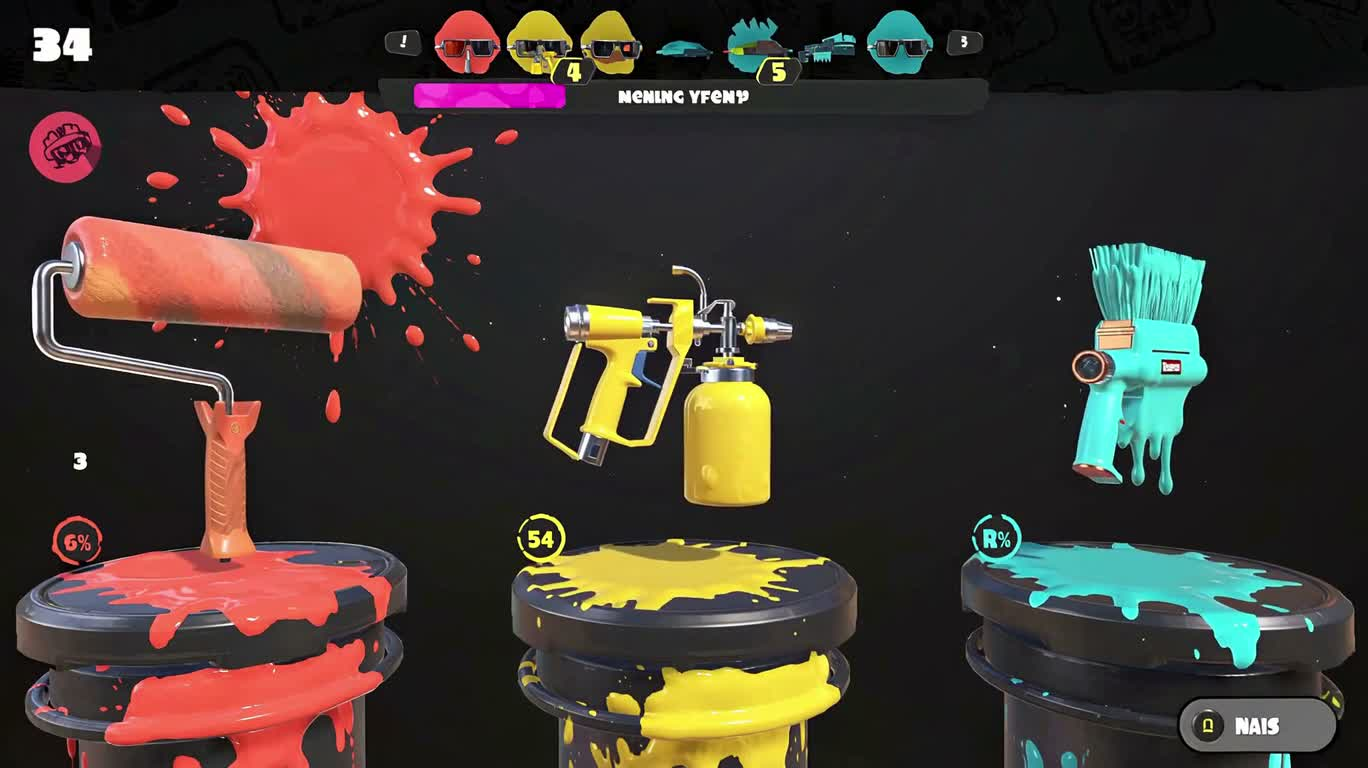
채색 무기 선택 화면
Painted Weapon Selection Screen
‘채색 무기 선택 화면’은(는) MiniMax H3로 만든 작품입니다. OpenZhenZhen에서 원본 프롬프트와 생성 예시를 살펴보고 새로운 창작에 활용해 보세요.
프롬프트
중국어 프롬프트
制作一段20秒、16:9的游戏风格装备选择动画,背景为炭灰色。三个原创涂料工具分别位于独立的圆形平台上缓慢旋转:左侧为珊瑚色滚筒,中间为黄色压力喷射器,右侧为青色刷具发射器。全程保持每个工具的轮廓和颜色不变。0至8秒,三个工具均匀旋转,界面干净稳定。第8秒,白色选择框从左侧平台移动到中央平台;黄色喷射器放大10%,并显示清晰的统计面板,标签必须准确写为“RANGE”“FLOW”“CONTROL”。第12秒,被选中的喷射器向测试墙发射一道受控的涂料弧线,然后返回平台。13至20秒保持完整界面显示,不得出现额外文字、拼写错误或变形物体。使用与机械旋转、界面提示音、一次选择确认音、压力蓄积和涂料撞击同步的音效。加入中速俏皮的电子节拍,并在选择确认音处收束。保持图形清晰锐利、颜色固定、运动平滑和时序精准。
영어 프롬프트
Create a 20-second, 16:9 game-style equipment selection animation on a charcoal background. Three original paint tools rotate slowly on separate circular platforms: a coral roller on the left, a yellow pressure sprayer in the center, and a cyan brush launcher on the right. Keep each tool’s silhouette and color unchanged throughout. From 0 to 8 seconds, show the three tools rotating evenly with a clean, stable interface. At 8 seconds, move a white selection frame from the left platform to the center platform; enlarge the yellow sprayer by 10 percent and reveal a crisp statistics panel labeled exactly “RANGE”, “FLOW”, and “CONTROL”. At 12 seconds, the selected sprayer fires one controlled arc of paint across a test wall, then returns to its platform. Keep the complete interface visible from 13 to 20 seconds, with no extra text, misspellings, or warped objects. Use synchronized mechanical rotation sounds, UI ticks, one selection chime, pressure buildup, and paint impact. Add a playful electronic beat at a moderate tempo that resolves on the selection chime. Maintain sharp graphic clarity, fixed colors, smooth motion, and precise timing.
주제 및 스타일
더 많은 이미지·동영상 프롬프트 보기 · 이미지 생성 · 동영상 생성 · AI 캔버스에서 만들기
관련 작품
- 승리의 순간, 슬로모션 색종이
‘승리의 순간, 슬로모션 색종이’은(는) MiniMax H3로 만든 작품입니다. OpenZhenZhen에서 원본 프롬프트와 생성 예시를 살펴보고 새로운 창작에 활용해 보세요.
- 폭풍 속의 자전거 탄 사람
‘폭풍 속의 자전거 탄 사람’은(는) MiniMax H3로 만든 작품입니다. OpenZhenZhen에서 원본 프롬프트와 생성 예시를 살펴보고 새로운 창작에 활용해 보세요.
- 황혼의 다리 위 추격전
‘황혼의 다리 위 추격전’은(는) MiniMax H3로 만든 작품입니다. OpenZhenZhen에서 원본 프롬프트와 생성 예시를 살펴보고 새로운 창작에 활용해 보세요.
- 비 오는 창가의 두 고양이
‘비 오는 창가의 두 고양이’은(는) MiniMax H3로 만든 작품입니다. OpenZhenZhen에서 원본 프롬프트와 생성 예시를 살펴보고 새로운 창작에 활용해 보세요.
- 설산 도로의 랠리카와 뒤쫓는 눈사태
‘설산 도로의 랠리카와 뒤쫓는 눈사태’은(는) MiniMax H3로 만든 작품입니다. OpenZhenZhen에서 원본 프롬프트와 생성 예시를 살펴보고 새로운 창작에 활용해 보세요.
- 생체 기계 고슴도치 초상화
‘생체 기계 고슴도치 초상화’은(는) MiniMax H3로 만든 작품입니다. OpenZhenZhen에서 원본 프롬프트와 생성 예시를 살펴보고 새로운 창작에 활용해 보세요.