OpenZhenZhen AI 프롬프트 갤러리 · MiniMax H3 · video
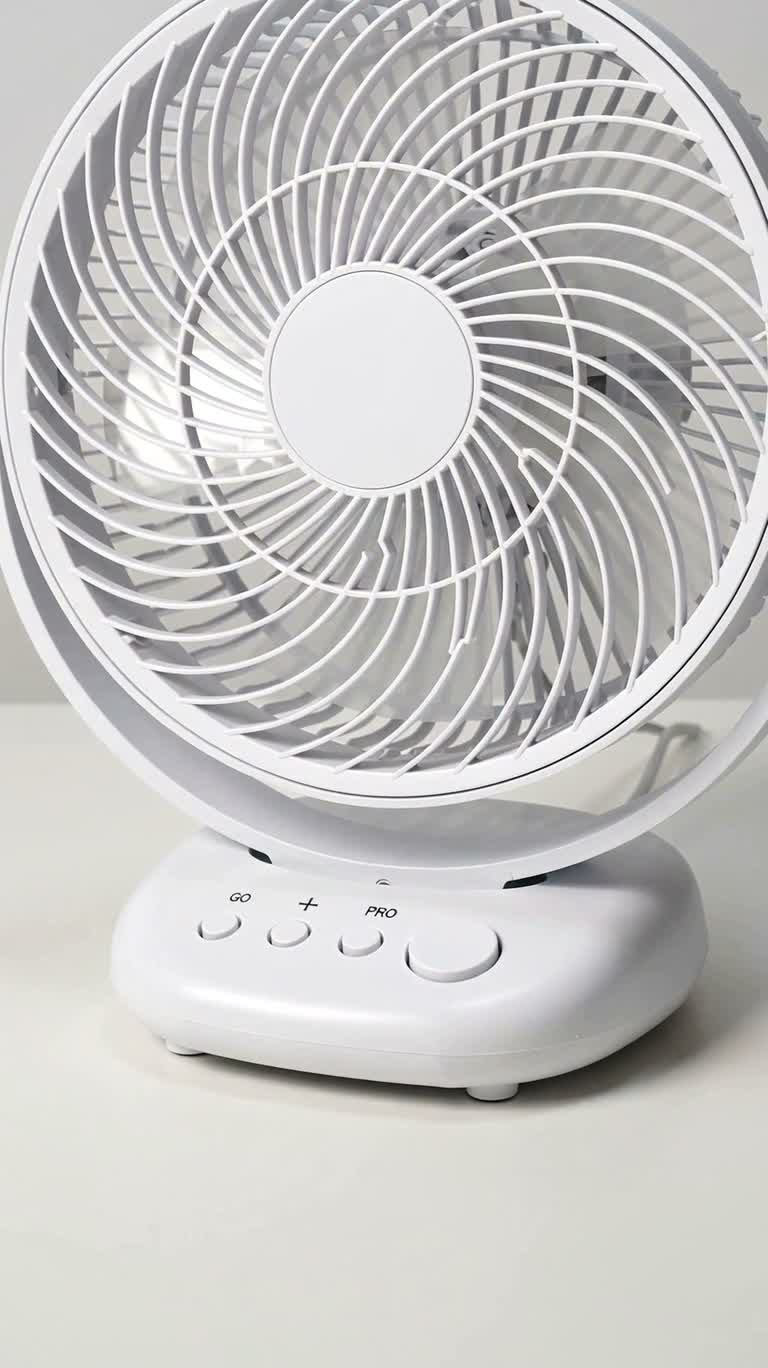
미니멀 화이트 소용돌이 선풍기 광고
Minimalist White Swirl Fan Ad
‘미니멀 화이트 소용돌이 선풍기 광고’은(는) MiniMax H3로 만든 작품입니다. OpenZhenZhen에서 원본 프롬프트와 생성 예시를 살펴보고 새로운 창작에 활용해 보세요.
프롬프트
중국어 프롬프트
制作一支严格15秒、9:16竖屏的写实电影级科技产品广告,白色摄影棚与白色桌面。产品全程保持一致:圆形风罩、独特的六瓣交织旋涡扇叶、白色圆角底座,以及固定不变的四个机械按钮,左至右为 go、plus、pro、reset;reset尺寸最大。禁止新增、减少、移动、镜像或交换按钮。 0.0–1.5秒:正面三分之四英雄镜头,风扇静止,四个按钮完整可见,镜头缓慢推进,柔和高级棚拍光,真实塑料与金属材质。 1.5–6.0秒:硬切至产品正前方略微俯视的固定机位,完整显示风扇、底座和四个按钮。一只右手从左下方进入,并在整个连续操作中保持在画面内,不得剪辑、改变机位、镜像、变焦或重新进入。食指连续执行:按下go,抬起,水平向右移动恰好一个按钮距离,按下plus,抬起,再水平向右移动恰好一个按钮距离,按下pro,抬起,随后从右下方离开。手指不得向左、跳跃、穿过按钮或同时触碰两个按钮。每次按压都有清晰机械下沉反馈,未触碰按钮保持不动;按下go后低速启动,按下plus后加速,按下pro后达到最高速。 6.0–7.8秒:三分之四侧面广告镜头,风扇高速旋转,摄影机横向滑动。一张极轻薄的白纸被气流轻轻吹动。禁止出现手。 7.8–9.5秒:超近距离微距镜头,快速旋转的六瓣交织旋涡扇叶形成连续运动模糊,中心轴稳定,只有扇叶产生模糊。摄影机做极小幅度真实环绕,禁止变成悬浮标志、二维动画或发光特效。 9.5–11.0秒:低机位三分之四英雄镜头,风扇保持最高速,镜头缓慢拉远并轻微环绕。白纸和细白丝带随气流摆动。按钮仍为go | plus | pro | reset;不得出现手。 11.0–12.5秒:硬切回完全相同的正面固定机位。一只右手从右下方进入,直接移向最右侧大型reset按钮,不得经过go、plus或pro。在reset正上方停留约0.5秒后,食指垂直按下中心位置并产生明显机械行程。其余三个按钮保持静止,pro清楚位于左侧且未被触碰。 12.5–14.2秒:按下reset后立即展示风扇自然减速。六瓣旋涡从运动模糊逐渐变清晰,纸张和丝带逐渐停止,减速过程应能听见风扇电机声音明显降低。镜头略微滑回接近正面。 14.2–15.0秒:居中的最终产品英雄镜头,风扇完全停止,扇叶清晰静止,四个按钮清楚显示go | plus | pro | reset,极轻微推进,最后0.3秒定格。无字幕、无UI、无额外文字、无水印、无其他物体。保持高级极简工业设计广告风格、真实材质、柔和阴影、浅景深与电影级微距细节。
영어 프롬프트
Create a photorealistic cinematic technology product commercial in 9:16 vertical format, exactly 15 seconds long. Show a white desktop fan on a white studio table against a clean white background. The product must remain identical throughout: circular grille, distinctive six-lobed interwoven spiral blades, rounded white base, and exactly four permanently fixed mechanical buttons arranged left to right as go, plus, pro, reset. Reset is the largest button. Never add, remove, move, mirror, or swap buttons. 0.0–1.5s: Front three-quarter hero shot, fan stopped, all four buttons visible, slow dolly push-in, soft premium studio lighting, realistic plastic and metal. 1.5–6.0s: Hard cut to a fixed front view slightly above the product, with the whole fan, base, and all four buttons visible. One right hand enters from the lower left and never leaves the frame during the sequence. The index finger performs one continuous action with no cuts, camera changes, mirroring, zoom changes, or re-entry: press go, lift, slide horizontally right exactly one button distance, press plus, lift, slide horizontally right exactly one button distance, press pro, lift, then exit toward the lower right. The finger must never move left, jump, pass through a button, or touch two buttons at once. Each press gives clear mechanical depression feedback; untouched buttons remain still. The fan starts at low speed after go, increases after plus, and reaches maximum speed after pro. 6.0–7.8s: Three-quarter side advertising shot, fan spinning fast, camera gliding laterally. A very light white sheet moves gently in the airflow. No hand. 7.8–9.5s: Extreme macro shot of the rapidly rotating six-lobed spiral blades. The hub stays stable; motion blur is limited to the rotating blades. Use a tiny realistic orbit, never a floating logo, 2D animation, or glowing effect. 9.5–11.0s: Low three-quarter hero shot, maximum speed, slow dolly-out with a subtle orbit. A white sheet and thin white ribbon move in the airflow. Buttons remain go | plus | pro | reset; no hand. 11.0–12.5s: Hard cut back to the same fixed front view. A right hand enters from the lower right and goes directly to the large far-right reset button without passing over go, plus, or pro. Hold above reset for about 0.5 seconds, then press its center vertically with obvious mechanical travel. The other three buttons remain still; pro is clearly to the left and untouched. 12.5–14.2s: Immediately show the complete fan decelerating naturally after reset. The six-lobed spiral transitions from motion blur to clarity, the sheet and ribbon gradually stop, and the slowdown is audibly perceptible as the fan motor sound decreases. The camera glides slightly back toward front. 14.2–15.0s: Centered final hero shot with the fan fully stopped, blades sharp and stationary, all four buttons clearly reading go | plus | pro | reset, extremely subtle push-in, final 0.3 seconds locked off. No subtitles, UI, extra text, watermark, or additional objects. Maintain premium minimalist industrial design advertising style, realistic materials, soft shadows, shallow depth of field, and cinematic macro detail.
주제 및 스타일
더 많은 이미지·동영상 프롬프트 보기 · 이미지 생성 · 동영상 생성 · AI 캔버스에서 만들기
관련 작품
- 별빛 주차장의 저중력 견인
‘별빛 주차장의 저중력 견인’은(는) MiniMax H3로 만든 작품입니다. OpenZhenZhen에서 원본 프롬프트와 생성 예시를 살펴보고 새로운 창작에 활용해 보세요.
- 계곡 초콜릿 우유 광고
‘계곡 초콜릿 우유 광고’은(는) MiniMax H3로 만든 작품입니다. OpenZhenZhen에서 원본 프롬프트와 생성 예시를 살펴보고 새로운 창작에 활용해 보세요.
- 블랙 앤 골드 럭셔리 향수병 광고 클로즈업
‘블랙 앤 골드 럭셔리 향수병 광고 클로즈업’은(는) MiniMax H3로 만든 작품입니다. OpenZhenZhen에서 원본 프롬프트와 생성 예시를 살펴보고 새로운 창작에 활용해 보세요.
- 스마트 냉장 보관함의 FoodBox 배송
‘스마트 냉장 보관함의 FoodBox 배송’은(는) MiniMax H3로 만든 작품입니다. OpenZhenZhen에서 원본 프롬프트와 생성 예시를 살펴보고 새로운 창작에 활용해 보세요.
- 오렌지와 화이트 러닝화 도시 모험 광고
‘오렌지와 화이트 러닝화 도시 모험 광고’은(는) MiniMax H3로 만든 작품입니다. OpenZhenZhen에서 원본 프롬프트와 생성 예시를 살펴보고 새로운 창작에 활용해 보세요.
- 비 내리는 쑤저우 정원의 차경
‘비 내리는 쑤저우 정원의 차경’은(는) MiniMax H3로 만든 작품입니다. OpenZhenZhen에서 원본 프롬프트와 생성 예시를 살펴보고 새로운 창작에 활용해 보세요.