OpenZhenZhen AI 프롬프트 갤러리 · zhenzhen-video-muse · video
뮤즈 비디오
muse-video
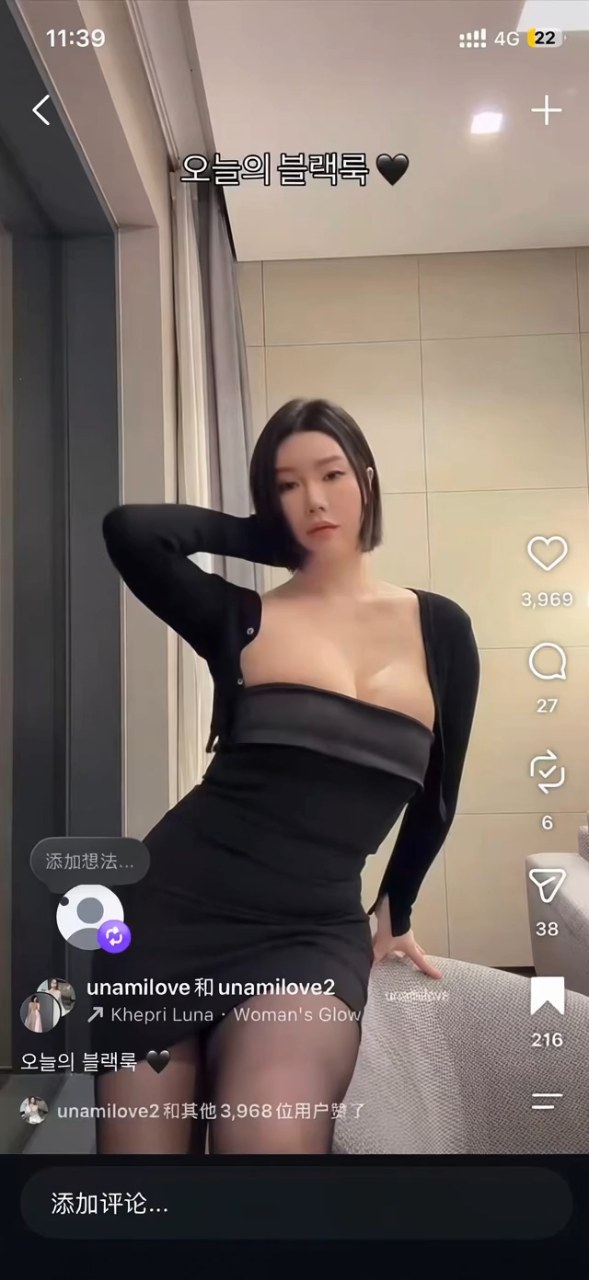
‘뮤즈 비디오’은(는) zhenzhen-video-muse로 만든 작품입니다. OpenZhenZhen에서 원본 프롬프트와 생성 예시를 살펴보고 새로운 창작에 활용해 보세요.
프롬프트
중국어 프롬프트
@图片1 为女生角色参考图,锁定五官、发型、服装与饰品一致性。 场景:@场景1 室内;参考图只作人物外观参考,不锁定首帧 音乐:生成节奏清晰、带暧昧张力的原创女声R&B-pop,BPM约100-108,低频贝斯+短促电子鼓点无歌词;镜头拿起/放下、突然怼脸都踩鼓点。叠加衣料、拨发、近距离呼吸、轻笑、室内底噪。 1)开场中近景:从面部到腿部,尽头推进,人物扭动身体 2)突然拿起镜头怼脸:前摄瞬间贴到眼睛、鼻尖、嘴唇,精致妆容(粉珊瑚唇、淡眼线、碎发贴颊)充满画面;表情在娇羞与撩人之间切换——先垂眼抿嘴,再抬眼锁镜头,轻歪头、轻眨眼、嘴角若有若无的笑。 3)再放下或稍退:回到胸以上,拨发、侧头;下一拍又猛地拿起怼脸,捕捉神情变化。可穿插一次极近下半脸/嘴唇特写。 4)收尾停在贴脸近景,暧昧对视与呼吸起伏。 帮我生成一个视频吧
영어 프롬프트
Use @Image1 as the female character reference. Keep her facial features, hairstyle, outfit, and accessories consistent throughout the video. The reference image defines her appearance only; it does not lock the first frame. Scene: Indoors, using @Scene1 as the scene reference. Audio: Generate an original, lyric-free R&B-pop track with an intimate, flirtatious atmosphere and a female vocal texture. Tempo: approximately 100–108 BPM. Use deep bass and crisp, punchy electronic drums. Synchronize the camera being picked up, put down, and suddenly brought close to her face with the drum beats. Layer in subtle fabric rustling, hair movement, close breathing, a soft chuckle, and quiet indoor ambience. 1. Opening: Begin with a medium-close shot framing her from face to legs. The camera slowly pushes in as she gently sways her body. 2. On the beat, she suddenly picks up the camera and brings it close to her face, as if using the front-facing camera. Her eyes, nose, and lips fill the frame. Her makeup is refined: soft coral-pink lips, subtle eyeliner, and a few loose strands of hair against her cheeks. Her expression shifts between shy and flirtatious: she first lowers her eyes and presses her lips together, then looks up directly into the lens, tilts her head slightly, blinks softly, and gives a barely perceptible smile. 3. She puts the camera down or moves it slightly away, returning to a chest-up shot. She brushes back her hair and turns her head to the side. On the next beat, she quickly picks the camera up and brings it close to her face again, capturing the change in her expression. Maintain the character’s appearance from @Image1. Optionally insert one extreme close-up of the lower half of her face and lips. 4. End on an intimate, face-filling close-up. She holds eye contact with the lens while her breathing rises and falls gently. Keep the performance natural and the camera movements physically plausible. Maintain consistent facial features, hairstyle, clothing, and accessories across all shots.
더 많은 이미지·동영상 프롬프트 보기 · 이미지 생성 · 동영상 생성 · AI 캔버스에서 만들기
관련 작품
- H3 단독, 7초 전투 테스트
‘H3 단독, 7초 전투 테스트’은(는) Minimax H3로 만든 작품입니다. OpenZhenZhen에서 원본 프롬프트와 생성 예시를 살펴보고 새로운 창작에 활용해 보세요.
- 실크와 부드러운 빛
‘실크와 부드러운 빛’은(는) MiniMax H3로 만든 작품입니다. OpenZhenZhen에서 원본 프롬프트와 생성 예시를 살펴보고 새로운 창작에 활용해 보세요.
- 할로윈 악마 셀카
‘할로윈 악마 셀카’은(는) MiniMax H3로 만든 작품입니다. OpenZhenZhen에서 원본 프롬프트와 생성 예시를 살펴보고 새로운 창작에 활용해 보세요.
- 할로윈 어안 셀카
‘할로윈 어안 셀카’은(는) MiniMax H3로 만든 작품입니다. OpenZhenZhen에서 원본 프롬프트와 생성 예시를 살펴보고 새로운 창작에 활용해 보세요.
- 할로윈 어안 렌즈 공포 셀카
‘할로윈 어안 렌즈 공포 셀카’은(는) MiniMax H3로 만든 작품입니다. OpenZhenZhen에서 원본 프롬프트와 생성 예시를 살펴보고 새로운 창작에 활용해 보세요.
- 달빛 환상의 나라 초상화
‘달빛 환상의 나라 초상화’은(는) MiniMax H3로 만든 작품입니다. OpenZhenZhen에서 원본 프롬프트와 생성 예시를 살펴보고 새로운 창작에 활용해 보세요.