OpenZhenZhen AI Prompt Gallery · GPT Image 2.6 · image
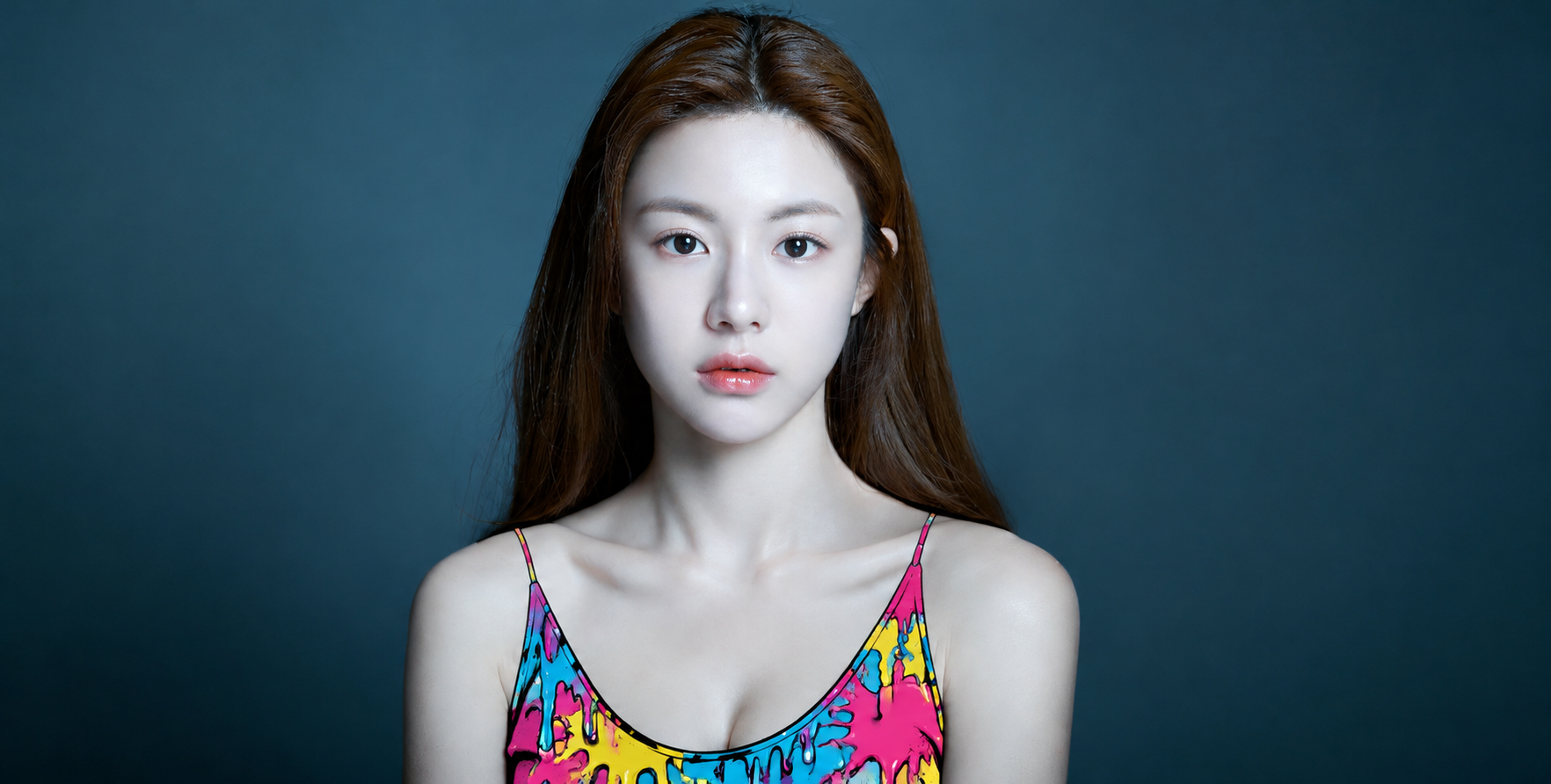
Pop Art Drip Paint Top Close-Up Photo Edit
Pop Art Drip Paint Top Close-Up Photo Edit — explore this GPT Image 2.6 creation on OpenZhenZhen, with its original prompt and a reusable generation example.
Prompt
Chinese prompt
将完整的人物身份参考图本身作为要编辑的原照片;不要裁剪、改变取景或替换图片。仅将人物身上的黑色细肩带上衣转换为大胆鲜艳的波普卡通效果:以亮青色、洋红色、黄色和粉红色作为平涂色块,配上干净粗黑的轮廓线,并加入俏皮的油漆飞溅与融化或迸发色彩的动势。多数滴痕向下流动,同时限制在目标物体轮廓内。效果要贴合原物体的位置、形状、大小、褶皱和透视,并自然融入照片。人物的脸部身份、发型、表情、皮肤和姿势,以及其他衣物、背景、物件、光线、构图和所有非目标区域,都保持写实且不变。保留原有细节和文字,不增添新元素。呈现高分辨率波普艺术质感,让卡通目标与写实照片形成超现实反差。
English prompt
Use the complete provided identity-reference image itself as the original photo to edit; do not crop, reframe, or substitute another image. Transform only the black thin-strap top worn by the person into a bold, colorful pop-art cartoon treatment, using bright cyan, magenta, yellow, and pink as vivid flat fills, a clean thick black outline, and playful paint splashes with a melting-or-bursting color effect. Let most drips flow downward while staying within the target object's silhouette. Fit the treatment to the original object's position, shape, scale, folds, and perspective so it blends naturally into the photograph. Keep the person's face, identity, hairstyle, expression, skin and pose, and all other clothing, background, objects, lighting, composition and non-target areas photorealistic and unchanged. Preserve existing details and text; add no new elements. Aim for a high-resolution pop-art finish with a surreal contrast between the illustrated target and realistic photo.
Explore more AI image and video prompts · Try image generation · Try video generation · Create on the AI canvas
Related works
- A Real Person and Cute Plush Toys Before a Midsummer Fan
A Real Person and Cute Plush Toys Before a Midsummer Fan — explore this GPT Image 2.6 creation on OpenZhenZhen, with its original prompt and a reusable generation example.
- Antarctic Explorer
Antarctic Explorer — explore this Moss Image creation on OpenZhenZhen, with its original prompt and a reusable generation example.
- Realistic Portrait of an Adult Woman in an Industrial-Style Indonesian Café
Realistic Portrait of an Adult Woman in an Industrial-Style Indonesian Café — explore this GPT Image 2.6 creation on OpenZhenZhen, with its original prompt and a reusable generation example.
- Chocolate Lava Cake
Chocolate Lava Cake — explore this Moss Image creation on OpenZhenZhen, with its original prompt and a reusable generation example.
- Hyperrealistic Fashion Portrait of a Long-Haired Woman by the Window
Hyperrealistic Fashion Portrait of a Long-Haired Woman by the Window — explore this GPT Image 2.6 creation on OpenZhenZhen, with its original prompt and a reusable generation example.
- Realistic Collector's 3D Miniature Figure in the Palm
Realistic Collector's 3D Miniature Figure in the Palm — explore this GPT Image 2.6 creation on OpenZhenZhen, with its original prompt and a reusable generation example.